Tv Series

Tuesday, 30 June 2015

Find out the biggest tech hits and misses of 2015, so far...


Find out the biggest tech hits and misses of 2015, so far...


Half the year has passed. And six months in the dynamic world of technology and social media means a slew of exciting launches, as well as some casualties. Here’s our recap of what worked, and what didn’t, so far. Of course, we’re also looking forward to a few other things, the future of which, we, the consumers, are yet to determine.

THE HITS:

Net neutrality: India marked a major milestone in digital activism when Internet users bombarded the Telecom Regulatory Authority of India (TRAI) with a million emails to ‘Save the Internet’. The TRAI had invited public opinion on its proposal to allow telecom-Internet providers to charge differently for different uses of data. The ensuing outrage saw several big and small app developers pull out of schemes like Airtel Zero and Internet.org. 

Drones: It’s almost impossible to write about the first half of 2015 without mentioning the increasing popularity of quadcopters. From ones that took selfies and captured images in 4k resolution to those that followed voice commands and hunted down other drones, launches took place thick and fast in the first quarter of the year. 

The rise of Chinese smartphone makers: There was a time when the smartphone turf war was fought between Apple and Samsung. Not anymore. Posing a serious challenge are Chinese smartphone makers, like Xiaomi, Oppo, OnePlus, Meizu, Lenovo, Huawei and Gionee. And if the popularity of their devices is anything to go by, the big boys have a lot to worry about. 

Live-streaming apps: Though not exactly a new concept — services have been around since the 2000s — the launch of Meerkat and Periscope made it easier to broadcast lives on the go. And if the selfie trend is anything to go by, the fad to point at and post whatever is going on isn’t going away soon. 

Dubsmash: You’d have to be living under a rock to have not heard of this popular app that lets you lip-sync to songs, movie quotes, and more. From Alia Bhatt and Saina Nehwal to Hugh Jackman and Rihanna, many have fallen victim to Dubsmash.


Oculus Rift: Critics call it ‘the coolest product in the world right now’ and gamers can’t wait to get their hands on this headset that promises a truly immersive experience in the virtual world. Shipping begins in the first quarter of 2016 with pre-orders possible by the end of this year. Ready for some virtual reality?

Xiaomi Mi band: Fitness trackers turned specialists this year with smart bands that monitored sleep, stress and even your heart rate at a premium price. That was till a certain Chinese smartphone maker entered the market with a price tag of `999 and made everyone sit up, changing the rules of the game overnight.


Mortal Kombat X: There was a lot of hype around this game’s release and, if the sales figures are anything to go by, the title has hit bulls-eye, dominating charts around the world. It has done well both critically and commercially, and the action-hungry gaming community too has taken a liking to it. Clearly, a win-win situation.

Online activism gets an icon, literally: From gay and feminist emojis to ones that help kids to report abuse and represent racial diversity, emoji activism took off like never before. And though they had detractors claiming that such activism was unnecessary, it did catch the fancy of netizens.


Samsung Galaxy S6: Termed as the ‘Android phone to beat this year’, it boasts of an improved fingerprint reader, a camera shortcut key and decluttered take on Android 5.0.


THE MISSES:

Selfie sticks banned: While the craze around selfies refuses to die down, the list of places where the popular picture-taking gadget is unwelcome is getting longer. Wimbledon and Disney World have joined the likes of The Museum of Modern Art, The Palace of Versailles, the Colosseum, and Manchester United and Arsenal’s home grounds, among others, in enforcing a no selfie-stick rule.


Alternative payment systems: Not too long ago, the bitcoin captured the imagination of millions as an alternative currency. Experts believed 2015 would see the emergence of digital wallets and other alternative payment systems. Though Apple Pay, Paytm and a few others did create some amount of buzz, they are nowhere close to replacing traditional payment systems in India. 

Online piracy rampant in India: As broadband penetration improves, developing countries like India are increasingly contributing to the rise in piracy. This year, the first four episodes of the Game of Thrones leaked online before the show’s premiere. The first episode was downloaded a whopping 13 million times — a new piracy record for the series. Most of those downloads (10 per cent) were from within the United States. India was a runner-up along with countries like France, Brazil, China, Russia, UK, India, Canada, Australia and Spain.


Secret shuts down: Apps promoting anonymity and inviting users to confess their deepest and darkest thoughts were quite the rage for quite a while. Then, suddenly, the creators of Secret announced plans to shut it down citing anonymity as a double-edged sword. The app had been dealing with highly publicised cases dealing with bullying and gossip for some time now. 

AIB Roast/India’s Daughter banned: Two bans in the first half of the year caused much outrage among netizens. While the AIB Roast was pulled down from YouTube for its supposed obscene content, the documentary India’s Daughter was banned by an Indian court because the excerpts “appear to encourage and incite violence against women”. Despite the bans, both went viral.


Internet Explorer to be replaced: The the Microsoft browser Internet Explorer (IE) will soon become extinct. Microsoft is working on a new browser, tentatively called Project Spartan, to replace it. RIP Internet Explorer, you will be missed.

Barack Obama’s debut on Twitter: It is not every day that the world’s most powerful man makes his social media debut. In less than five hours, @POTUS had a million followers. However, Caitlyn Jenner, formerly Bruce Jenner, broke that soon after by hitting the same mark in four hours.


AWAITING VERDICT

Windows 10: There’s been a lot of buzz around this latest OS from Microsoft. But while it may be a task to get those on Windows 7 to upgrade and mollify those who hate Windows 8, expect a lot of noise from critics and fans alike on July 29 when it becomes available for free download.


Android TV: Google’s first attempt to popularise Android TV is best not talked about. However, the second act has seen more apps, better hardware and a host of new features. Of course, none of this guarantees success for the relatively new platform. But if word-of-mouth catches on, it may well be worth that little extra expense.

Apple Watch: There’s been no shortage of gadget reviews for Apple’s latest device. For the most part, the consensus is that it’s probably the best smart watch you’re going to find in the market. But the apps aren’t anything to rave about. With most Apple fans yet to get their hands on the product, the jury is out on this one.


Thankyou for Visit.

Xiaomi Redmi Note 4G; available now at Rs 7,999.


Xiaomi slashes price of the Redmi Note 4G; available now at Rs 7,999


Xiaomi had taken to its social media pages yesterday and hinted at revealing something ‘jaw-dropping’ today for fans. The announcement made by the company was not the launch of a new smartphone but rather, a price cut of Rs 2000 for the Redmi Note 4G, which is now available at Rs 7,999.

Starting today, Redmi Note 4G will be available on Mi.com and across Mi India partners including Flipkart, Amazon, Snapdeal, The Mobile Stores and Airtel stores.

Redmi Note 4G first went on sale in India in December 2014. It was Xiaomi’s very first 4G device to be introduced in India, with support for both 4G bands. The Redmi Note 4 sports a 5.5-inch HD IPS display. It is powered by 1.6GHz Qualcomm Snapdragon 400 MSM8928 processor.

The device includes an onboard storage of 8GB and can be further expanded up to 32GB via microSD card. The smartphone comes equipped with a 13MP rear camera along with a 5MP front shooter for selfies. It is powered by a 3100mAh battery and runs Xiaomi’s MIUI OS.

The Redmi Note, if you recall, is something of a record breaker in terms of sales, with Xiaomi having sold 10,000 units in just a second in Taiwan.

For Technical Specification Click here Redmi Note 4G.

Thankyou for Visit.

iOS 8.4 Now Available for Download.


iOS 8.4 Now Available for Download; Brings Apple Music, Fix for the Infamous Messages Bug, and More.


As promised by Apple, iOS 8.4 is now available for download on iPhone, iPad, and the iPod touch. The update brings an updated Music app that includes the much-touted Apple Music streaming service as well as a 24/7 free radio service called Beats 1. The updated Music app also includes Apple Music Connect, a social network of sorts that aims to connect artists with their fans.

The iOS 8.4 update is a 218MB OTA update for iPhone 6 factory unlocked (GSM) users running iOS 8.3, and the exact size will vary depending upon your iOS device, carrier, and current iOS version. Apart from the revamped Music app, the update also includes improvements for iBooks and other bug fixes. These include fix for the infamous bug that caused the iOS device to reboot when it received a specific series of Unicode characters.

As expected, Apple Music and Beats 1 Radio are available in India as well. After a free 3-month trial, users can continue to enjoy Apple Music at just Rs. 120 per month, with family plans (for up to six users) at Rs. 190 per month. That's a considerable discount compared to their dollar equivalents. Beats 1 Radio is of course free for life.

(Also see: Everything You Need to Know About Apple Music)


The world's biggest company is launching Apple Music as it sees consumer trends shift to streaming, which allows on-demand unlimited content online. At the heart of the strategy is Beats 1, which bills itself as a first global radio station and will be available in more than 100 countries.

Beats 1 will be free even without a subscription to Apple Music, whose streaming platform costs $9.99 a month (Rs. 120 in India) after a trial period a key distinction from streaming leader Spotify, which offers a free tier for on-demand music despite criticism from some artists.

Apple Music has sought to make a splash through big names on Beats 1, poaching the influential New Zealand-born DJ Zane Lowe from BBC Radio 1.

Thankyou for visit.

Monday, 29 June 2015

Windows 10


Windows 10

Microsoft tries to strike a balance for every kind of user


Microsoft prepares Insiders for Windows 10 upgradeMicrosoft prepares Insiders for Windows 10 upgradeWindows 'Threshold' (Windows 9?) preview could go live in SeptemberWindows 'Threshold' (Windows 9?) preview could go live in SeptemberMicrosoft might add Cortana to Windows 10 in JanuaryMicrosoft might add Cortana to Windows 10 in JanuaryMicrosoft will reveal the future of Windows 10 in JanuaryMicrosoft will reveal the future of Windows 10 in January

Yes, the Start menu is back. Yes, there are virtual desktops. No, the Charms bar hasn't gone away. And no, we don't know when Windows 10 will ship or what it will cost. But we've seen the technical preview of Windows 10 and the word to bear in mind for this release is productivity.

Microsoft's Joe Belfiore repeatedly emphasised that this is a very early build without even all the features that have been announced, and that there might be rough spots. We didn't see any problems in the time we had to try it out at Microsoft's San Francisco event, but what's clear is that there is plenty more to come.


This isn't the place to look for changes in Explorer or the control panel, let alone desktop tools like Paint and Notepad or Store apps like Music and Video. The technical preview is about the core features that are supposed to prove Microsoft can balance touch, mouse and keyboard without making any users feel abandoned.


Start


As expected, the Start menu is the default if you use Windows 10 with a keyboard and mouse, though you can keep the full-screen Start screen if you prefer it. Even on the Start menu, you can pin Live Tiles in multiple sizes on the right, but on the left you also get the familiar list of pinned and recent applications, complete with jump lists for files, the search box that you can also use to run commands and a power button for shutting down or restarting your PC.


The search box has all the Windows 8 features, including results from Bing and the Windows store, and a separate Search menu next to the Start button gives you trending topics directly from Bing, too.


You can resize the Start menu, although oddly you can only drag to change the height; changing the width means picking a setting rather than just dragging with the mouse. This is certainly more familiar for mouse and keyboard users, but it remains to be seen whether the Windows 8 users who actually like touch will find it a step backwards.


Snaps, apps and virtual desktops


Using Alt Tab to move between open windows is a keyboard shortcut that's been around since 1990 and it still gives you a line of windows to choose from. As with Windows 8.1, those now include any modern apps you have running, and those now open as windows on the desktop like any other software you're running, ready to be resized or snapped side by side. The new Task View button on the taskbar is there to introduce the idea of moving between windows to the vast majority of Windows users who've never tried Alt Tab.


Snapping does more than the 'two desktop apps getting half the desktop' layout that you get in Windows 8. If you have one narrow window, the second window can take up all the rest of the space, or you can snap four apps, one in each corner. Windows will even show thumbnails of open windows to help you pick the one you want to snap without rearranging everything.


But you can also get more complicated. The Windows-Tab keyboard shortcut introduced in Windows Vista for the 3D Flip Explorer and reused for the Windows 8 modern task switcher now gives you a view that's almost exactly the same as Alt-Tab except for the button at the bottom for adding a virtual desktop - and the list of any virtual desktops you already have open. Those are live thumbnails and you can use your mouse to pick not just the set of windows you want to put on screen but even the window you want to start using.


Virtual desktops aren't a new idea but they never graduated from utility to main Windows feature because they can be confusing to manage. There's a subtle clue in the taskbar to help you; if an app is open but not in the current desktop, it shows up as underlined rather than outlined in the taskbar - and if you click on its icon you go straight to it, and the rest of that desktop. The question remains whether that's enough to stop a feature designed only for power users from confusing everyone else, but it certainly signals to desktop power users that Windows 10 is supposed to be designed for them.


Charms


Despite rumours, the Charms bar that you get when you swipe the edge of a touchscreen hasn't gone away in Windows 10, but you might not see it when you use the Windows-C keyboard shortcut. If you have a mouse and keyboard and the window that's active is a modern app like the Windows Store, that keyboard shortcut brings up a mini Charms menu hanging off the top left corner of the app instead.


This has the three dots that give you any extra commands, now clearly labelled as App Commands, the Search, Share and Settings charms that are usually on the Charms bar, plus other useful commands like Play, Print and Project, plus the option of running the app Full Screen. If you can't print from the app, the Print charm is on the menu but greyed out.


That makes the Charms less touch friendly but much more mouse friendly when you're controlling an app; which is what you want when you're using a mouse - all the way over to the side of the screen and all the way back isn't efficient with a mouse. When you're controlling Windows - which is what you get when you don't have a modern app selected - having the Charms and settings bar at the side of the screen is fairly logical. And those Charms are staying around (although probably in a different arrangement with a more logical division of what shows up where) because when the Windows team took them out, users at Microsoft complained loudly. That big friendly sidebar for choosing and changing Wi-Fi turns out to be really handy.


This is the Windows 10 experience in microcosm. Microsoft is trying to keep the bits of the modern interface that people like and find useful, but not have them be annoying and intrusive when mouse users are getting things done.


Command prompt


At the other extreme from Charms is the command prompt, where you go to run scripts and batch files. In recent years the emphasis has been on the far more powerful PowerShell automation system, but in the spirit of "no feature left behind" the humble command line is getting the same harmonisation as the rest of Windows 10. You can finally use familiar keyboard shortcuts to select a line or a word at a time, and to copy and paste text.


Only a tiny fraction of Windows users may ever use the command line, but Microsoft wants them to be happy as well - and this is the kind of modernisation that's a decade overdue.


Management and data containers


Some of the most interesting features for business aren't actually visible in the technical preview of Windows 10. Being able to upgrade PCs using management tools, being able to manage PCs thought the same Mobile Device Management systems you use for smartphones and tablets, an enterprise app store that lets businesses manage volume licences for modern apps instead of making users sign in to a work PC with a personal Microsoft account, and separation of personal and business data using encrypted containers that doesn't mean changing all your applications but persists even when you copy files onto a USB stick or cloud service will all appeal to businesses, but you can't try them out until the previews of Windows Server and the necessary management tools come along.


Internet Explorer


There's only one version of Internet Explorer in the preview of Windows 10 and it's the full desktop version. It's not a new version of IE, and the advances in IE are coming out on their own schedule (like the series of updates that delivered WebGL support). That doesn't necessarily mean the immersive version of Internet Explorer is going away, but it doesn't make sense to have a separate, full-screen browser when all the modern apps are now just windows on the desktop. We don't know what changes there will be to the IE interface and the Windows team hasn't yet decided how to handle the different modes of the browser - because having a plugin-free version of the browser is definitely a security advantage, but unless it's immediately obvious how to switch between them people will get annoyed and confused. Getting challenges like this right without abandoning the benefits of Windows 8 is where Windows 10 will succeed or fail.


Early verdict


Windows 10 is all about balancing the demands of different users. It's not just business users with desktop PCs and keyboards, versus tablet users. Windows is for sensors and data centres and Windows Phone and Xbox One as well as tablets and laptops and desktop PCs and giant wall screens and all the devices in between (at least in Microsoft's ambitions). But what we're seeing in this first technical preview release is very much about balancing the heritage of two decades on Windows with the new world of touch, and with making IT teams comfortable with the BYOD and consumerisation features introduced in Windows 8 by giving them more security options and more management.


At the preview event, there wasn't a touch screen in sight and we only got to use Windows 10 with a mouse and keyboard on a big screen that takes full advantage of the new ways of arranging windows and swapping between virtual desktops. The technical preview is designed to make power users happy, not change the hey - the copy is done for the world.


Thankyou for Visiting..

The SSL Certificate And Your Website’s Security.


The SSL Certificate And Your Website’s Security.


SSL Certificate and Website Security

When you are surfing the internet, a lot of information is being exchanged between the web host and the device being used to surf the internet. This type of information can always be easily breached by hackers, especially if it involves online transactions and this has always been a major issue when dealing with the internet. Nowadays, cases of online theft are becoming increasingly popular. There is one way of determining whether a site is safe to use through an SSL Certificate which is powered by the beauty of cryptography.


How SSL Cryptography Works?

Cryptography ensures that data is transmitted in a means that only the intended party can access it. You can easily determine a site which has an SSL certificate by the padlock icon that is displayed beside the web address. So how do SSL certificates work? SSL in full is Secure Sockets Layer. An SSL certificate provides tight security during the exchange of data.

PadLock Icon Showing SSL Security.

In SSL cryptography, encryption makes use of separate keys for the decryption and encryption of data. Encryption keys are public and anyone can use them. But the decryption keys (ones used to turn encrypted data into meaningful information) are private and are kept secret. The SSL certificate, on the other hand, can simply be described as a tiny data file that has the appropriate information about a certain website. The information can be quickly read by the host connection once the request for connection is received. It is through an SSL that a website can prove its authenticity to a web browser.

How To Get SSL Certificate?


An SSL certificate is not handed out like a college certificate. There are a number of companies called Certificate Authorities (CA)that authenticate that a site/server is legitimate and sign a resultant digital certificate which is then stored, just like a cookie is stored on your browser. The certificate will continuously alert all incoming connections and protocols that the connection is trustworthy.

SSL Certificate Advantages & benefiets


SSL certificates make online data-exchange, especially financial transactions, safer. It is a common rule of thumb not to trust any e-commerce site that does not have an SSL certificate. There is just too much information floating around online nowadays such as credit card info, banking information etc. The safety of all these vital information will be ensured by the SSL certificate, and every browser will accept the websites incoming connections. However, most small websites, such as blogs, don’t really need to supply an SSL certificate.

Thankyou for Visit.

Top 10 Web Hacking Techniques of 2014-2015.

iBall launches Andi Avonte 5 with rotating 8MP camera, priced at Rs 5,999.


iBall launches Andi Avonte 5 with rotating 8MP camera, priced at Rs 5,999


iBall launches Andi Avonte 5 with rotating 8MP camera, priced at Rs 5,999
iBall’s new smartphone is dual-sim and runs on Android 4.4 KitKat and has a 5-inch FWVGA (480x854p) IPS display.

NEW DELHI: iBall has announced a new budget smartphone Andi Avonte 5. Priced at Rs 5,999, Andi Avonte 5's key feature is its 8MP rotating camera. The 180-degree rotatable camera with LED flash can be used both as a primary and secondary camera.

iBall's new smartphone is dual-sim and runs on Android 4.4 KitKat and has a 5-inch FWVGA (480x854p) IPS display.

Powered by a 1.3GHz quad-core processor and 1GB RAM, the smartphone offers 8GB internal storage. Users can install microSD cards of up to 32GB for additional storage.


Andi Avonte 5 packs a 2150mAh battery and comes with read and write support for 21 regional languages including Assamese, Bangla, Bodo, Dogri, Gujarati, Hindi, Kannada, Kashmiri, Konkani, Maithili, Manipuri, Malayalam, Marathi, Nepali, Oriya, Punjabi, Sanskrit, Santali, Sindhi, Tamil and Telugu.

The phone supports 3G, GPRS/EDGE, Wi-Fi, Bluetooth and GPS on connectivity front.

iBall Andi Avonte 5 specifications

5-inch (480 x 854 pixels) IPS display
1.3 GHz quad-core processor
1GB RAM, 8GB internal memory,  expandable memory up to 32GB with MicroSD
Android 4.4 (Kitkat)
Dual SIM
8MP rotating camera with dual LED Flash
3.5mm audio jack, FM Radio
3G HSPA+,WiFi 802.11 b/g/n, Bluetooth 4.0 with A2DP, GPS
2150mAh battery
The iBall Andi Avonte 5 comes in Gold color and is priced at Rs. 5,999.

Thankyou for visiting.

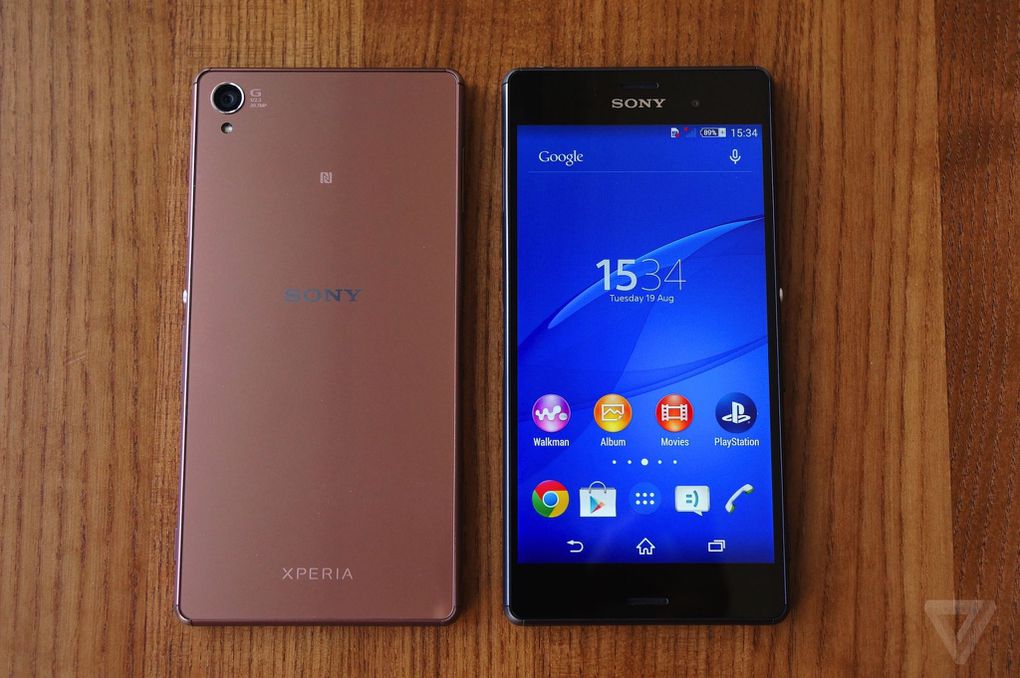
First look at Sony Xperia Z3+ ; at a hefty Rs 55,990 price point.


First look at Sony Xperia Z3+: Familiar design and excellent specs, but at a hefty Rs 55,990 price point.


Sony used to launch two flagships every year, but that pattern has clearly undergone a change, as we did not see any Sony flagship launch at Mobile World Congress. Instead we saw the Xperia Aqua M4 and the Xperia C4 launch at MWC and last month in India. Today Sony announced its flagship Xperia Z3+. This phone will replace the incumbent Z3 as the flagship phone from the Japanese company. We got to spend some time with the device, and here are our first impressions.

Build Quality and Design

Sony has been using a similar design playbook for years now, and with the Sony Xperia Z3+ things don’t look that different either. The metallic frame on the sides have become slimmer at 6.9mm. Sony has added in shock-resistant caps around the edges. The metallic frame is complemented by Corning Gorilla Glass 3 protection on the front and rear sides.


The microSD card and nano SIM card slots have moved to the left hand side and are protected by a cap. On the right hand side you have the power/standby button followed by the volume rocker button and at the base you have the dedicated camera shutter button. The metallic build on these buttons gives a good feedback. The 3.5mm audio jack is located on the top and the microUSB charging port is on the base.
The Xperia Z3+ comes with IP 65/68 certifications making it water and dust resistant. The microUSB charging port is capless as well.

Display

The Sony Xperia Z3+ comes with a 5.2-inch full HD display. Like we have seen in the past, it brings Sony’s Triluminos display for mobile with X-reality engine for mobile. The display also comes with smart adaptive display which helps to show you a balanced image even in bright sunlit conditions. While the demo using a steady image looked fine, we will need to try this outdoors to see it in action. The display is bright and colours are vivid. The text appears crisp and there isn’t any pixillation that stands out. But the protective cover on the display surface makes it a smudge magnet and you will need to constantly keep cleaning the phone. You are better off removing the protective cover altogether.

Chipset, RAM, Storage

Housing the Qualcomm Snapdragon 810 SoC which has an octa-core processor paired with 3GB of RAM, the Sony Xperia Z3+ has impressive internals. While using the phone we did not notice any lag or slowdown. However, the phone did tend to get warm when we shot some sample images or tried playing around with the AR modes. This is an issue we had also faced with the Xperia Z3. Considering the Snapdragon 810 has faced flak in the past for overheating, we will have to really test the Z3+ for overheating issues once we start reviewing it. On the storage front, you have 32GB of which around 18GB was available to the user. It does offer a microSD card slot in case you wish to expand the storage capacity.

OS, Connectivity

The phone comes with Android 5.0.2 along with Sony’s Xperia skin atop it. On first glances the layout does not look any different from what we had seen with the Z3/Z3 Compact or even Z2. Apart from Sony’s custom widgets, there are also some pre-installed apps and media content, which you can delete or uninstall. On the connectivity front, the Xperia Z3+ comes with a single SIM slot which takes in a nano SIM card. It supports Wi-fi 802.11ac, Bluetooth 4.1, GPS with A-GPS, GLONASS and supports USB OTG.

Camera

Sony is one of the leading smartphone sensor makers. It has the best sensors for its flagship. The Xperia Z3+ also sports the 20.7MP Exmor RS sensor sporting rear camera with a sensor size of 1/2.3-inch and an aperture of f/2.0. On the front there is a 5MP camera with 1/5-inch Exmor R sensor sporting sensor with f/2.4 aperture. Both the cameras sport 25mm wide-angle lenses. The rear camera is flush with the surface and does not create a bump. Camera interface is similar to what we have seen with older flagships which features such as Intelligent Auto, Manual mode, AR effects, High frame rate shooting and so on. While the image quality looked decent in the indoor shots, we will keep our verdict reserved till we test out the camera of the phone.

Battery 

Sony Xperia Z3 had a 3,100 mAh battery which was impressive. The Xperia Z3+ has a 2,930mAh battery and Sony claims that it can give around 2 days worth of usage. We will have to test this claim, but if past history is any indicator to go by specially with the dedicated power saving modes and Stamina mode improvements, then things look positive. The phone supports quick charge feature which lets you charge the phone completely in 45 mins using Sony charger, a claim we will await testing.

Conclusion

The phone is good looking and has impressive specs. The battery life of Xperia series is known to be good and the Z3+ comes with a newer variant of the Stamina mode. But the price of Rs 55,990 is definitely steep, considering the Xperia Z3 had launched at Rs 51,990 – which we felt was overpriced around the time. So we will need to really test the phone for performance, battery life as well as camera quality to see if it is really worth the asking price amidst able competition from Samsung, LG and Apple.